8. AArch64
In this lab, we’ll shift our attention to the AArch64 Instruction Set Architecture (ISA). AArch64 instructions can be represented in two ways:
Through human-readable assembly code; or
Through machine code which is understood directly by the processor.
We’ll first get a feel for the ISA by writing a few simple functions in assembly code. Once this is accomplished, Section 9 introduces vector instructions in the context of floating point arithmetic. Then, Section 10 brings us closer to the hardware again by discussing machine code and its execution by the control and datapath of a processor.
8.1. Copying Data
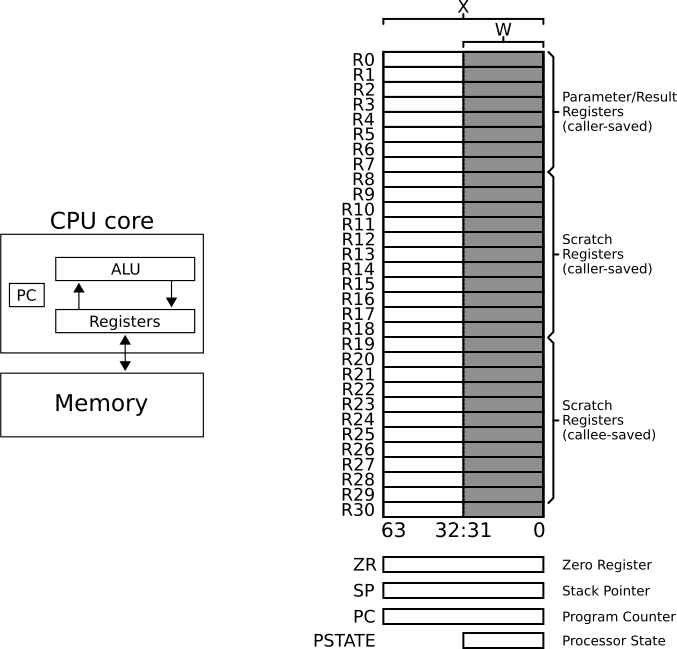
Fig. 8.1.1 Left: Illustration of a load-store architecture. The ALU is only able to access data in registers. Data residing in memory has to be loaded to registers first before it can be processed. Right: Illustration of AArch64’s 31 64-bit general-purpose registers, the special registers ZR, SP, PC, and PSTATE. The architectural names of the general-purpose registers are R0 - R30.
AArch64 is a load-store architecture (see Fig. 8.1.1). This means that instructions either perform memory accesses or operate on data in registers, but cannot do both in a single instruction.
A memory access instruction transfers data from memory to the registers (load) or transfers data from the registers to memory (store). In this task, we’ll copy data from one memory location to another. Since we cannot directly move data between two memory locations, we first load the data from the source location to registers and then store it to the target location. For this task we’ll use AArch64’s general-purpose registers which are shown in Fig. 8.1.1.
Optional Note
Certain recent extensions of the Arm architecture relax the strict load-store model. One such example is the LDADD instruction which loads data from memory, adds a register value to it, and writes the result back to memory.
#include <cstdint>
#include <cstdlib>
#include <iostream>

extern "C" {
  void copy_c( uint64_t const * i_a,
               uint64_t       * o_b );
  // TODO: uncomment
  //void copy_asm( uint64_t const * i_a,
  //               uint64_t       * o_b );
}

int main() {
  uint64_t l_a[7] = { 1, 21, 43, 78, 89, 91, 93 };

  uint64_t l_b_0[7] = { 0 };
  uint64_t l_b_1[7] = { 0 };

  // copy_c
  std::cout << "### calling copy_c ###" << std::endl;
  copy_c( l_a,
          l_b_0 );

  for( unsigned short l_va = 0; l_va < 7; l_va++ ) {
    std::cout << l_a[l_va] << " / " << l_b_0[l_va] << std::endl;
  }

  // copy_asm
  std::cout << "### calling copy_asm ###" << std::endl;
  // TODO: uncomment
  // copy_asm( l_a,
  //           l_b_1 );

  for( unsigned short l_va = 0; l_va < 7; l_va++ ) {
    std::cout << l_a[l_va] << " / " << l_b_1[l_va] << std::endl;
  }

  return EXIT_SUCCESS;
}
#include <stdint.h>

void copy_c( uint64_t const * i_a,
             uint64_t       * o_b ) {
  uint64_t l_tmp_0 = i_a[0];
  uint64_t l_tmp_1 = i_a[1];
  uint64_t l_tmp_2 = i_a[2];
  uint64_t l_tmp_3 = i_a[3];
  uint64_t l_tmp_4 = i_a[4];
  uint64_t l_tmp_5 = i_a[5];
  uint64_t l_tmp_6 = i_a[6];

  o_b[0] = l_tmp_0;
  o_b[1] = l_tmp_1;
  o_b[2] = l_tmp_2;
  o_b[3] = l_tmp_3;
  o_b[4] = l_tmp_4;
  o_b[5] = l_tmp_5;
  o_b[6] = l_tmp_6;
}
        .text
        .align 4
        .type   copy_asm, %function
        .global copy_asm
copy_asm:
        // TODO: Implement copy_asm

        ret
The code in Listing 8.1.1 and Listing 8.1.3 provides the required boilerplate for your kernel.
Further, a reference implementation of the copy function in C is given in Listing 8.1.2.
Your task is to copy the seven 64-bit unsigned integers in array l_a to array l_b_1 in Listing 8.1.1 by implementing the function copy_asm in assembly language.
Note
Use the instructions LDR (immediate) and STR (immediate) for loading and storing data in your implementation.
Do not implement any stack transfers and only use the first 18 general-purpose registers, i.e., X0 - X17 to adhere to the procedure call standard.
Use the flags -pedantic -Wall -Wextra -Werror whenever invoking the compiler.
Do this not only here but in all tasks.
Tasks
Implement the function
copy_asmin the filecopy_asm.s. Use the template in Listing 8.1.3 for your implementation. Follow the ideas of the C implementation in Listing 8.1.2, do not use a loop in your code.Compile the C kernel
copy_cgiven in Listing 8.1.2 using the optimization flag-O2. Disassemble the compiler-generated machine code. Briefly explain the obtained assembly code.Implement a new function
copy_asm_loopin the filecopy_asm.s. In this implementation use a loop to copy the seven values.
8.2. Adding Two Arrays
Great, we are able to move data from A to B. Even better if we could process our data, don’t you think? Let’s do another simple example for this!
Assume that you have two memory addresses stored in the pointers l_a and l_b.
Each pointer references the start of an array of 64-bit unsigned integer values stored consecutively in memory.
For example, if you have 10 values, each array is 10 \(\times\) 64 bits = 640 bits in size.
This equals 80 bytes per array or 160 bytes total.
Now, our goal is to add the values in the two arrays l_a and l_b, and store the result in a third location in memory.
Getting the data into the general-purpose registers and back to memory is simple; we just programmed a kernel for this in Section 8.1.
The only missing piece of the puzzle is an instruction which processes the data and effectively adds the values in two general-purpose registers.
For this, we once again have a look at the base instructions of the ISA.
ADD (shifted register) is a suitable instruction.
#include <cstdint>
#include <cstdlib>
#include <iostream>

extern "C" {
  void add_c( uint64_t         i_n_values,
              uint64_t const * i_a,
              uint64_t const * i_b,
              uint64_t       * o_c );
  void add_asm( uint64_t         i_n_values,
                uint64_t const * i_a,
                uint64_t const * i_b,
                uint64_t       * o_c );
}

int main() {
  uint64_t l_n_values = 10;

  // init pointers
  uint64_t * l_a = nullptr;
  uint64_t * l_b = nullptr;
  uint64_t * l_c_0 = nullptr;
  uint64_t * l_c_1 = nullptr;

  // allocate memory
  l_a   = new uint64_t[ l_n_values ];
  l_b   = new uint64_t[ l_n_values ];
  l_c_0 = new uint64_t[ l_n_values ];
  l_c_1 = new uint64_t[ l_n_values ];

  // init arrays
  for( std::size_t l_va = 0; l_va < l_n_values; l_va++ ) {
    l_a[l_va] = l_va;
    l_b[l_va] = l_va*2;
    l_c_0[l_va] = 0;
    l_c_1[l_va] = 0;
  }

  // add_c
  std::cout << "### calling add_c ###" << std::endl;
  add_c( l_n_values,
         l_a,
         l_b,
         l_c_0 );

  for( std::size_t l_va = 0; l_va < l_n_values; l_va++ ) {
    std::cout << l_a[l_va] << " / " << l_b[l_va] << " / " << l_c_0[l_va] << std::endl;
  }

  // add_asm
  std::cout << "### calling add_asm ###" << std::endl;
  add_asm( l_n_values,
           l_a,
           l_b,
           l_c_1 );

  for( std::size_t l_va = 0; l_va < l_n_values; l_va++ ) {
    std::cout << l_a[l_va] << " / " << l_b[l_va] << " / " << l_c_1[l_va] << std::endl;
  }

  // free memory
  delete [] l_a;
  delete [] l_b;
  delete [] l_c_0;
  delete [] l_c_1;

  return EXIT_SUCCESS;
}
i_n_values values of the two arrays i_a and i_b and writes them to o_c.#include <stdint.h>
void add_c( uint64_t i_n_values,
uint64_t const * i_a,
uint64_t const * i_b,
uint64_t * o_c ) {
for( uint64_t l_va = 0; l_va < i_n_values; l_va++ ) {
uint64_t l_tmp_a = i_a[l_va];
uint64_t l_tmp_b = i_b[l_va];
uint64_t l_tmp_c = l_tmp_a + l_tmp_b;
o_c[l_va] = l_tmp_c;
}
}
Once again, a template for the required C++ driver is provided in Listing 8.2.1. Further, a reference C implementation of the addition kernel is given in Listing 8.2.2. Thus, the only missing part is the assembly kernel: Time to get to work!
Tasks
Implement the function
add_asmin assembly language and use the fileadd_asm.sfor your implementation. Follow the ideas of the C implementation in Listing 8.2.2.Compile the C kernel
add_cgiven in Listing 8.2.2 using the optimization flag-O2. Disassemble the compiler-generated machine code. Briefly explain the obtained assembly code!
8.3. Computing Fibonacci Numbers
Next, we implement a more complex algorithm. The Fibonacci numbers are given by the following sequence:
Listing 8.3.1 provides the usual C++ driver. As shown in line 6 and 7, the C and assembly functions take the index \(n\) as input and return the respective Fibonacci number, i.e., \(F_n\). Once again, we’ll get started by implementing a C function which is somewhat close to assembly code. This will then be our recipe for the assembly variant.
 1#include <cstdint>
 2#include <cstdlib>
 3#include <iostream>
 4
 5extern "C" {
 6  uint64_t fibonacci_c( uint64_t i_id );
 7  uint64_t fibonacci_asm( uint64_t i_id );
 8}
 9
10int main() {
11  uint64_t l_id = 5;
12  uint64_t l_number_0 = 0;
13  uint64_t l_number_1 = 0;
14
15  // fibonacci_c
16  std::cout << "### fibonacci_c ###" << std::endl;
17  l_number_0 = fibonacci_c( l_id );
18
19  std::cout << "id / number: " << l_id << " / " << l_number_0 << std::endl;
20
21  // fibonacci_asm
22  std::cout << "### fibonacci_asm ###" << std::endl;
23  l_number_1 = fibonacci_asm( l_id );
24
25  std::cout << "id / number: " << l_id << " / " << l_number_1 << std::endl;
26
27  return EXIT_SUCCESS;
28}
Tasks
Implement the reference version
fibonacci_cin the filefibonacci_c.c. Keep your implementation close to assembly-level operations, avoiding high-level C abstractions.Implement the assembly version
fibonacci_asmin the filefibonacci_asm.s. The implementation must be general-purpose, accepting \(n\) as input parameter rather than using a hardcoded value. This is also emphasized by the function declaration’s argumentuint64_t i_idin line 7 of Listing 8.3.1.Hint
Keep in mind the procedure call standard, i.e., the compiler will make the input
i_idavailable inX0. You have to return theuint64_tresult inX0as well.
8.4. Assembly Building Blocks
This section examines common C/C++ building blocks and guides their implementation in AArch64 assembly. For this, three source files and the resulting output are provided:
 1#include <cstdint>
 2
 3uint32_t high_lvl_0( uint32_t value );
 4
 5int64_t high_lvl_1( int64_t );
 6
 7uint64_t high_lvl_2( int32_t option );
 8
 9void high_lvl_3( int32_t * option,
10                 int32_t * result );
11
12int32_t high_lvl_4( uint32_t x,
13                    uint32_t y,
14                    uint32_t z );
15
16void high_lvl_5( uint32_t   num_iters,
17                 int64_t  * value );
18
19void high_lvl_6( uint64_t   num_iters,
20                 int32_t    inc,
21                 int32_t  * value );
 1#include "high_level.h"
 2
 3uint32_t high_lvl_0( uint32_t value ) {
 4  return value;
 5}
 6
 7int64_t high_lvl_1( int64_t ) {
 8  return 0;
 9}
10
11uint64_t high_lvl_2( int32_t option ) {
12  uint64_t l_result = 5;
13
14  if( option < 64 ) {
15    l_result = 10;
16  }
17
18  return l_result;
19}
20
21void high_lvl_3( int32_t * option,
22                 int32_t * result ) {
23  if( *option > 50 ) {
24    *result = 0;
25  }
26  else {
27    *result = 1;
28  }
29}
30
31int32_t high_lvl_4( uint32_t x,
32                    uint32_t y,
33                    uint32_t z ) {
34  int32_t l_ret = 0;
35
36  if( x < y && x < z ) {
37    l_ret = 1;
38  }
39  else if( y >= z ) {
40    l_ret = 2;
41  }
42  else {
43    l_ret = 3;
44  }
45
46  return l_ret;
47}
48
49void high_lvl_5( uint32_t   num_iters,
50                 int64_t  * value ) {
51  for( uint32_t l_i = 0; l_i < num_iters; l_i++ ) {
52    *value += 10;
53  }
54}
55
56void high_lvl_6( uint64_t   num_iters,
57                 int32_t    inc,
58                 int32_t  * value ) {
59  uint64_t l_va = num_iters;
60  do {
61    *value += inc;
62    l_va--;
63  } while( l_va != 0 );
64}
 1#include <iostream>
 2#include "high_level.h"
 3
 4int main() {
 5  std::cout << "running driver" << std::endl;
 6
 7  std::cout << "high_lvl_0(10): "
 8            << high_lvl_0( 10 )
 9            << std::endl;
10  std::cout << "high_lvl_1(10): "
11            << high_lvl_1( 10 ) << std::endl;
12  std::cout << "high_lvl_2(64): "
13            << high_lvl_2( 64 ) << std::endl;
14  std::cout << "high_lvl_2( 5): "
15            << high_lvl_2(  5 ) << std::endl;
16
17  int32_t l_high_lvl_opt3 = 27;
18  int32_t l_high_lvl_res3 = -1;
19  high_lvl_3( &l_high_lvl_opt3,
20              &l_high_lvl_res3 );
21  std::cout << "high_lvl_3 #1: "
22            << l_high_lvl_res3 << std::endl;
23
24  l_high_lvl_opt3 = 73;
25  high_lvl_3( &l_high_lvl_opt3,
26              &l_high_lvl_res3 );
27  std::cout << "high_lvl_3 #2: "
28            << l_high_lvl_res3 << std::endl;
29  std::cout << "high_lvl_4(1,2,3): "
30            << high_lvl_4( 1, 2, 3 ) << std::endl;
31  std::cout << "high_lvl_4(4,2,3): "
32            << high_lvl_4( 4, 2, 3 ) << std::endl;
33  std::cout << "high_lvl_4(4,3,3): "
34            << high_lvl_4( 4, 3, 3 ) << std::endl;
35
36  int64_t l_high_lvl_value5 = 500;
37  high_lvl_5(  17,
38              &l_high_lvl_value5 );
39  std::cout << "high_lvl_5: " << l_high_lvl_value5 << std::endl;
40
41  int32_t l_high_lvl_value6 = 23;
42  high_lvl_6( 5,
43              13,
44              &l_high_lvl_value6 );
45  std::cout << "high_lvl_6: "
46            << l_high_lvl_value6 << std::endl;
47
48  // low-level part goes here
49
50  std::cout << "finished, exiting" << std::endl;
51  return EXIT_SUCCESS;
52}
 1running driver
 2high_lvl_0(10): 10
 3high_lvl_1(10): 0
 4high_lvl_2(64): 5
 5high_lvl_2( 5): 10
 6high_lvl_3 #1: 1
 7high_lvl_3 #2: 0
 8high_lvl_4(1,2,3): 1
 9high_lvl_4(4,2,3): 3
10high_lvl_4(4,3,3): 2
11high_lvl_5: 670
12high_lvl_6: 88
13finished, exiting
Tasks
Explain briefly what each of the seven functions does.
Implement the functions in assembly language. Use the filenames
low_level.handlow_level.swith corresponding function names:low_lvl_0,low_lvl_1, …,low_lvl_6. Document your source code thoroughly.Verify your low-level implementations by extending the driver program.